Members and roles
Invite your team and choose what each person may do.
Everyone in your Tenant has one role.
| Owner | Tenant Admin | Member | |
|---|---|---|---|
| See Devices and Messages | ✓ | ✓ | ✓ |
| Add, link and unlink Devices; set Send Caps | ✓ | ✓ | |
| Delete Devices | ✓ | ||
| Send test Messages | ✓ | ✓ | |
| API Keys and Webhook | ✓ | ✓ | |
| Invite people | any role | Members only | |
| Change roles, remove people, rename the Tenant | ✓ | ||
| See the Subscription | ✓ | ✓ |
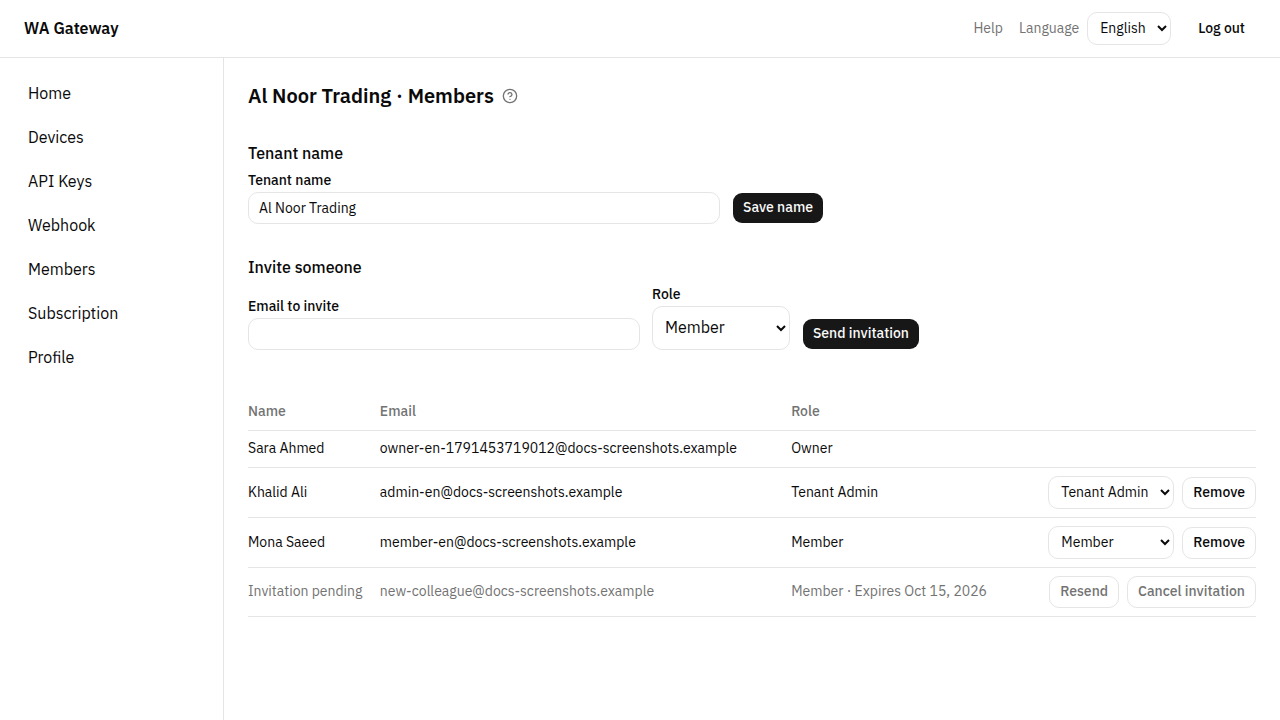
Invite someone
- Go to Members.
- Under Invite someone, enter their email and choose a Role.
- Choose Send invitation.
They receive an email with a link. When they open it and choose Accept invitation, they join your Tenant. They must log in with the same email that received the invitation.
Until then the invitation shows as Invitation pending. You can Resend it or Cancel invitation.
Change a role or remove someone
Owners can change anyone's role or Remove them, except themselves. A removed person loses access at once.
To leave a Tenant yourself, choose Leave Tenant. The last Owner can't leave: make someone else Owner first.
Rename the Tenant
Owners can change the Tenant's name at the top of the Members page, then choose Save name.