API Keys
Create the secret keys your software uses to call the API.
An API Key lets your software (your website, CRM or app) call our API for your Tenant. It is not used to log in as a person.
Owners and Tenant Admins can manage API Keys.
Create a key
- Go to API Keys.
- Enter a Key name that says which software uses it, for example "Website" or "CRM" (up to 60 characters).
- Choose Create key.
- Choose Copy, and put the key in your software's settings right away. It is shown only once. We keep only a fingerprint of it, so even we can't show it again.
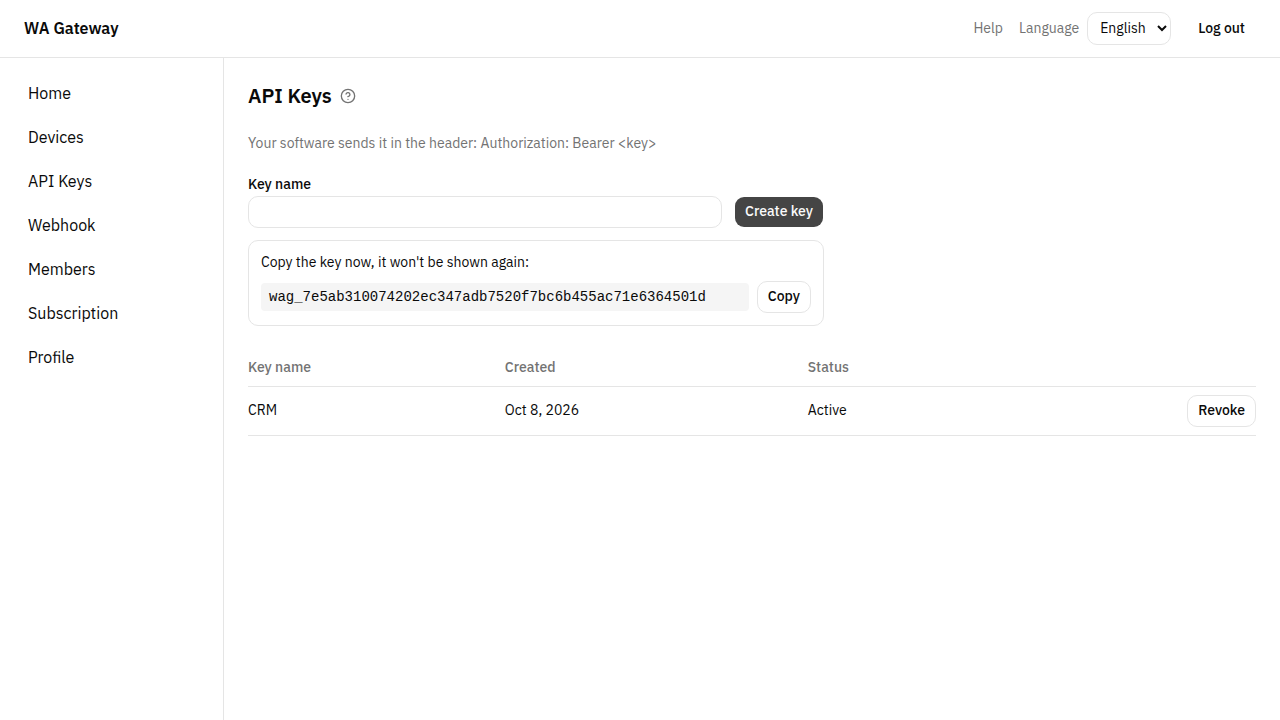
Your software sends the key in a header with every request:
Authorization: Bearer YOUR_API_KEYSee Authentication.
Revoke a key
Choose Revoke next to a key. It stops working at once for any software that uses it. You can't undo this. Create a new key instead.
Keep keys safe
- Use one key per piece of software. Then, if one leaks, you revoke only that one.
- Keep keys on your server only. Never put a key in a website's JavaScript or in a mobile app, where anyone can read it.
- If you think a key leaked, create a new one, switch your software to it, then revoke the old one.